
| Attribute | Description |
| Pay Day | The computed Payday for the attendance. This is usually the same as the Day column. However, for a Third Shift Employee, the Payday will be the date following the Day when the "Third shift prior to Payroll day" check box is checked in the configuration for Pay Rules. |
| Start Time | The current start time of the row being shown in the audit so that you may visually associate the row in the audit to the row in the attendance or labor grids. |
| Table Name | The table in which the data was changed (includes ATTENDANCE and LABOR). |
| Changed On | The date and time when the row and column were changed. |
| Changed By | The employee who changed the row and column being audited. |
| Field Changed | The column that was changed. |
| Original Value | The original value of the column. |
| New Value | The changed value of the column. |
| Comment | A comment for this row. |
| Attendance Status | The status of the attendance entry. |
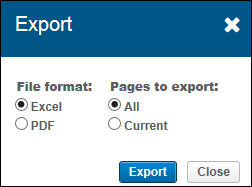
When you click the Export button, the Export dialog box is displayed:
In this dialog box, you can select the File Format to export and the Pages to export.
After you click Export, the file will be exported locally.