Global Deployment Right-Click Menu
The same options as these in right -click
menu are available in Action Menu.
Global Deployment Report tab
|

|
| Command |
Description |
| Refresh
|
The View is refreshed. |
|
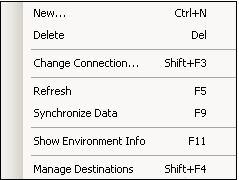
Monitored
Environments tab
|
|
| Command |
Description |
| New...
|
Add new Monitored server. |
| Delete
|
Delete selected server. |
| Change Connection...
|
Open a window with properties
of Registered Server. |
| Refresh
|
Refresh the list of Monitored servers. |
| Synchronize Data
|
Invoke synchronization of data. |
| Show Environment Info
|
Open a window |
| Manage Destinations
|
Open a window Manage
Destination Servers Window. |
|
Deployment
Landscape tab
The right-click menu can be accessed by using right-clicking anywhere
on the Deployment Landscape Workspace.
|
|
| Command |
Description |
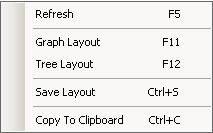
| Refresh
|
Refresh the deployment landscape displayed in the View
Pane. |
| Graph Layout
|
Automatically arrange all the items on the diagram
in a graph form. |
| Tree Layout
|
Automatically arrange all the items on the diagram
in a tree form. |
| Save Layout
|
Save changes made in items' layout. |
| Copy to Clipboard
|
Copy the diagram to the Clipboard. |
|
All
Landscape Environments tab
|
|
| Command |
Description |
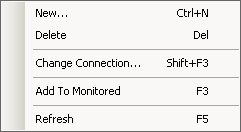
| New...
|
Add new Monitored Server. |
| Delete
|
Delete Server (this option is available only for not
Monitored server). |
| Change Connection...
|
Establish a connection to the server or break the connection
with selected server. |
| Add to Monitored
|
Add selected server to the Monitored environments.
(this option is available only for servers which are not
monitored). |
| Refresh
|
Refresh the list of all servers displayed in the . |
|