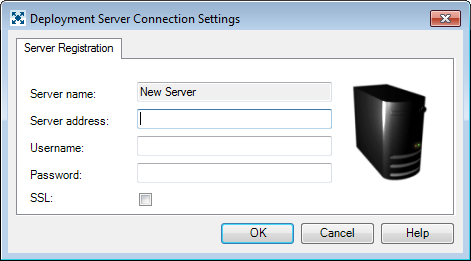
The Deployment Server Connection Settings window is used to register a new server.
| Field | Description |
| Server name | The DELMIA Apriso Global Process Manager Server Name retrieved from the server upon a successful connection. The name is based on the value of the "WebAddress" key located in the "Instance" section of the Central Configuration file (for details, see Central Configuration Documentation). If the server connection fails, a default name – "New Server #" – will be used, where # corresponds to the sequential server number. This field is not editable in the client application. |
| Server address | The address of the DELMIA Apriso Global Process Manager server. This can be a server name or an IP address. This field is required. |
| Username | The DELMIA Apriso username to be used to connect to the remote server. The same password should be used as when accessing the DELMIA Apriso Portal, but access will be granted only to users with appropriate permissions (i.e., with the Deployment Administrator role). See Requirements for more information. |
| Password | The DELMIA Apriso password to be used to connect to the remote server. |
| SSL | This option must be checked if the IIS server on which DELMIA Apriso is installed is configured to use SSL encryption. |
Once the necessary data is collected, the application attempts to connect to the server. If the application is able to establish a successful connection, it retrieves the server name and creates a new server node in the Console Tree with that server's name. If the attempt is unsuccessful, however, the node is created with the default name – "New Server #", where # is a consecutive number. In either case, the information is saved in the local registry.