
In the Replenishment Strategy Contents browser, the user can see and define more data for a specific Replenishment Strategy at the line-level.
To define new Replenishment Strategy Contents, click  (Add) and the Replenishment Strategy Content Properties
editor will appear.
(Add) and the Replenishment Strategy Content Properties
editor will appear.
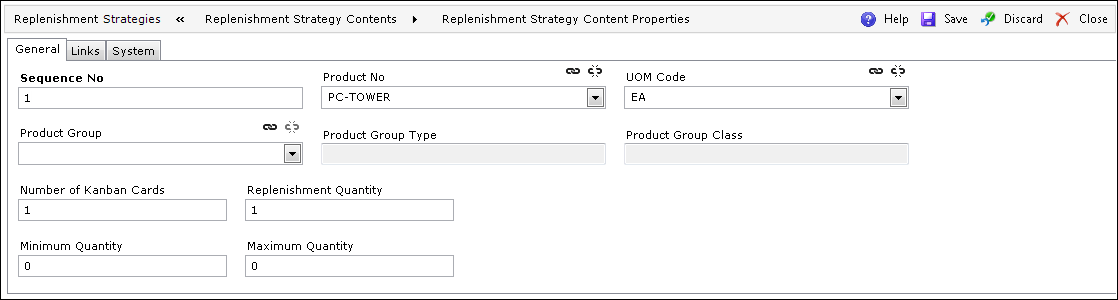
On the General tab of the Replenishment Strategy Content Properties screen, additional fields may be defined:
| Field | Description |
| Sequence No | Defines the sequence of the Replenishment Contents inside one
Replenishment Strategy.
The sequence number has to be greater than 0 and must be unique inside one Replenishment Strategy. |
| Product No | The product for the Replenishment Strategy Content. |
| UOM Code | The UOM for the product for the Replenishment Strategy Content. |
| Product Group | The group of the products for the Replenishment Strategy Content. |
| Product Group Type | The type of the Product Group. This field is populated automatically if the Product Group field has been defined. |
| Product Group Class | The class of the Product Group. This field is populated automatically if the Product Group field has been defined. |
| Number of Kanban Cards | The number of Kanban Cards for the Replenishment Strategy Content. |
| Replenishment Quantity | The quantity for the Replenishment Strategy Content. |
| Minimum Quantity | The minimum quantity for the Replenishment Strategy Content. |
| Maximum Quantity | The maximum quantity for the Replenishment Strategy Content.
Maximum Quantity must be greater than Minimum Quantity. |
It is also possible to define Unit Characteristics for the Replenishment Strategy Contents.
On the Links tab of the Replenishment Strategy Content Properties screen, there is a link to the Unit Characteristics browser.
For information on the System tab of the Replenishment Strategy Content Properties screen, see System.