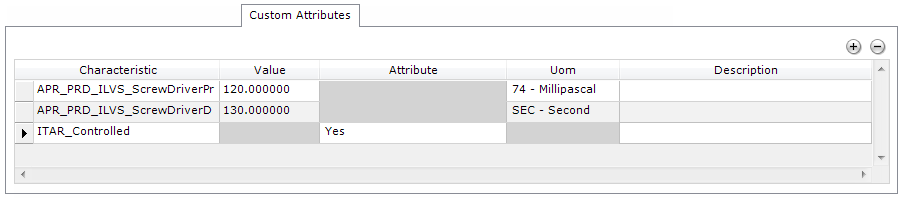
The same grid with user-defined Attributes is available for the Quality Defect Cockpit editor, Quality Inspection Cockpit editors, and Quality Planning editors.
This section contains a grid that allows for defining additional, Custom Attributes (Characteristics) for the selected entity (common for: Quality Defect in the Quality Defect Cockpit or Disposition, Disposition Line, and Disposition Test in the Quality Inspection Cockpit).
The Characteristics defined here describe the inspection entity they are assigned to and are different from the Characteristics linked to Disposition Tests (as described in the General tab), which describe a specific inspection object (product). The Characteristics used here are of the Custom Attribute usage type (the CHARACTERISTIC.Usage_ database field).
The Characteristics assigned to the entity are stored as Unit Characteristics (in the UNIT_CHARACTERISTIC database table) and are associated with the entity through the UnitID field.
Click  (Add) to add a new row and define a new Attribute (i.e., the set of values
for the fields described in the table below). Click
(Add) to add a new row and define a new Attribute (i.e., the set of values
for the fields described in the table below). Click  (Remove) to remove the
selected Attribute. When Save
is clicked, the changes made to the information on the grid are populated
in the database.
(Remove) to remove the
selected Attribute. When Save
is clicked, the changes made to the information on the grid are populated
in the database.
| Column | Description |
| Characteristic | A drop-down menu that allows for choosing a Characteristic from the list of those defined in the system (in the CHARACTERISTIC database table). After a Characteristic is selected, the remaining fields are filled with default information if available (e.g., UOM), or they are disabled if not applicable for the selected Characteristic or the selected Characteristic type (Attribute or Variable). |
| Value | The actual value of the selected Characteristic (when of the Variable type). |
| Attribute | The Attribute value of the selected Characteristic (when of the Attribute type) |
| Uom | The unit of measure for the selected Characteristic. |
| Description | Free-text description of the Characteristic. |